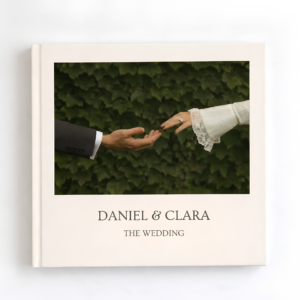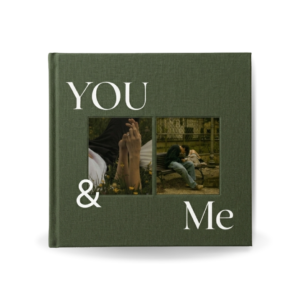
Yes, you can print a wedding photobook created in Canva.
In fact, many couples use Canva to design their wedding albums because it is easy to use, offers flexible editing options, and allows designs to be exported in high-quality formats suitable for professional printing.
Whether you create your photobook from scratch or use a professionally designed wedding photobook template, your finished design can be downloaded and printed through a variety of printing services.
Can Canva Print Wedding Photobooks?
In some countries and regions, Canva offers its own printing services, including photobooks and photo products.
Availability depends on your location, as Canva’s print services are not currently offered in every country. If Canva Print is available in your region, you may be able to order your wedding photobook directly from within Canva after completing your design.
Before placing an order, check Canva’s printing options to see which products and delivery services are available in your area.
Can I Print My Canva Wedding Photobook Elsewhere?
Absolutely.
One of the biggest advantages of creating a wedding photobook in Canva is that you are not limited to a single printing provider.
After finishing your design, you can export your photobook as a high-quality PDF and use:
- Local print shops near your location
- Professional photo book printing companies
- Online printing services
- Specialty wedding album printers
This flexibility allows you to compare prices, paper quality, cover options, and delivery times before choosing a printer.
How Do I Print a Canva Wedding Album?
The process is simple:
Step 1: Complete Your Design
Add your wedding photos, edit text, and customize your album pages.
Step 2: Download a High-Quality PDF
Export your wedding photobook as a PDF Print file from Canva to maintain the best image quality.
Step 3: Choose a Printing Service
You can upload your PDF to:
- A local printing shop
- An online photobook company
- A professional wedding album printer
- Canva Print (where available)
Step 4: Select Your Printing Options
Choose your preferred:
- Album size
- Paper type
- Cover material
- Binding style
- Finish options
Step 5: Place Your Order
Once uploaded, review the proof and place your order.
Do Darlae Wedding Photobook Templates Work for Printing?
Yes.
Darlae wedding photobook templates are specifically designed to be print-friendly while remaining easy to edit in Canva.
Each template includes:
- 30 professionally designed interior pages
- Front cover page
- Back cover page
This creates a complete 32-page wedding photobook that can be exported as a high-quality PDF for printing.
Because the templates are fully editable, you can personalize every page with your own wedding photographs, names, dates, and special memories before sending the file to your chosen printer.
Where Is the Best Place to Print a Canva Wedding Photobook?
The best printing option depends on your budget, location, and desired finish.
Many couples choose:
- Canva Print (where available)
- Local printing shops for faster turnaround
- Online photobook companies for convenience
- Professional album printers for premium wedding albums
Since Darlae templates provide you with a digital design file, you are free to use whichever printing service best suits your needs.
Why Use a Wedding Photobook Template?
Creating a wedding album from scratch can take hours of design work.
Darlae wedding photobook templates simplify the process by providing professionally designed layouts that are ready to customize. Simply drag and drop your photos into Canva, make any desired edits, and export the finished album for printing.
This allows couples to create a luxury-looking wedding photobook without hiring a designer or learning complicated design software.
Final Thoughts
Yes, you can print a Canva wedding photobook.
Depending on your location, Canva may offer direct photobook printing services. Alternatively, you can download your design as a high-quality PDF and print it through local print shops, online photobook providers, or professional wedding album printers.
Darlae wedding photobook templates make the process even easier by providing elegant, print-ready layouts that are fully editable in Canva. With 30 interior pages plus front and back covers, each template is designed to help couples transform their wedding photos into a timeless keepsake that can be printed almost anywhere.