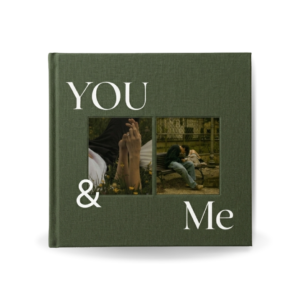
Your wedding day is filled with moments you never want to forget. From getting ready in the morning to your first dance as a married couple, every photo tells part of your story.
A wedding photobook is one of the best ways to preserve those memories. Instead of leaving hundreds of wedding photos stored on your phone or computer, you can organize them into a beautiful album that you can revisit for years.
If you are wondering how to make a wedding photobook, the good news is that it is easier than ever. You do not need graphic design experience, expensive software, or hours of work. With editable wedding photobook templates from Darlae, you can create a professional-looking wedding album in Canva within minutes.
What Is a Wedding Photobook?
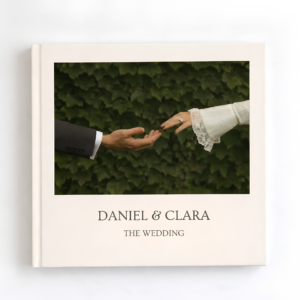
A wedding photobook is a professionally designed photo album that showcases your wedding memories in a structured and visually appealing layout.
Unlike traditional photo albums where photos are simply inserted into sleeves, a wedding photobook combines photography, design, typography, and storytelling to create a premium keepsake.
Modern wedding photobooks often include:
- Wedding portraits
- Ceremony photos
- Reception memories
- Family photographs
- Candid moments
- Wedding vows or special quotes
- Travel and honeymoon photos
The goal is to tell the complete story of your wedding day.
Why Create a Wedding Photobook?
Many couples invest thousands of dollars in wedding photography but never print their photos.
Creating a wedding photobook helps you:
- Preserve wedding memories permanently
- Display your favorite photographs beautifully
- Share your wedding story with family and friends
- Create a meaningful keepsake for future generations
- Organize hundreds of wedding photos into a single album
A well-designed wedding photobook transforms a collection of photos into a story you can enjoy for years.
The Easiest Way to Make a Wedding Photobook
The simplest way to create a wedding photobook is by starting with a professionally designed template.
Instead of building every page from scratch, you can use a ready-made wedding photobook template that already includes beautiful layouts, typography, and page designs.
Darlae wedding photobook templates are specifically created for couples who want a luxury wedding album without spending hours designing one themselves.
Each template is fully editable in Canva, allowing you to replace sample images with your own wedding photos using simple drag-and-drop editing.
This saves time while helping you achieve a professional result.
Why Choose a Darlae Wedding Photobook Template?
When creating a wedding album, design quality matters.
Darlae templates are designed with a luxury, timeless, and editorial style that highlights your photographs rather than distracting from them.
Benefits include:
Easy Canva Editing
No design experience is required. Simply open the template in Canva and replace the photos with your own.
Professional Layouts
Every page is carefully designed to create a cohesive and elegant wedding album.
Instant Digital Access
After purchase, you receive immediate access to your template so you can start editing right away.
Affordable Alternative
Hiring a designer to create a custom wedding album can be expensive. A Darlae template provides a premium look at a fraction of the cost.
Dedicated Support
If you experience any issues while editing your template, Darlae provides support to help you complete your photobook successfully.
How the Process Works
Creating your wedding photobook with Darlae is simple.
Step 1: Choose Your Wedding Photobook Template
Browse the Darlae collection and select the template that matches your wedding style.
Step 2: Open the Template in Canva
The template is delivered digitally and can be opened directly in Canva.
Step 3: Replace the Sample Images
Upload your wedding photographs and drag them into the existing layouts.
Step 4: Customize Text
Edit names, dates, quotes, and captions to personalize your album.
Step 5: Export for Printing
Once your design is complete, export a high-quality PDF ready for professional printing.
What Makes a Beautiful Wedding Photobook?
The best wedding photobooks focus on simplicity and storytelling.
Look for:
- Consistent page layouts
- High-quality photography
- Elegant typography
- White space that allows images to stand out
- A cohesive visual style throughout the album
Darlae templates are designed around these principles to create wedding albums that remain timeless rather than following short-lived design trends.
Frequently Asked Questions
Do I Need Canva Pro?
No. Most Darlae wedding photobook templates are designed to work with a free Canva account.
Can I Print My Wedding Photobook Anywhere?
Yes. Once you export your finished design as a high-resolution PDF, you can use any professional printing service.
Can I Edit Colors and Text?
Yes. Canva allows you to customize text, fonts, images, and many design elements.
What If I Need Help?
Darlae provides customer support if you encounter any issues while editing your template.
Final Thoughts
Making a wedding photobook does not need to be complicated. Instead of spending hours creating page layouts from scratch, you can start with a professionally designed wedding photobook template and focus on what matters most—your memories.
Darlae wedding photobook templates offer an affordable, elegant, and beginner-friendly solution for couples who want a luxury wedding album. With easy Canva editing, instant access, and dedicated support, creating your dream wedding photobook has never been easier.
Browse the Darlae collection today and transform your wedding photos into a timeless keepsake that you will treasure forever.